Working with sites
Every request about customers or bookings has to say which site it means. Here's how, and what the errors are telling you.
Sarah's app shows Thursday's bookings. Portland's Thursday, or Salem's? The request has to say.
That's the X-Location-Id header. It carries the id of the site you're asking
about, and it goes on every request that touches customers, bookings, invoices or
staff.
curl https://api.hyphabase.com/api/modules/clients \
  -u sk_live_xxx: \
  -H "X-Location-Id: 019aff48-a982-70b4-9be8-57eb265122d7"
Setup requests — creating sites, issuing keys, adding staff — don't need it. They happen above the level of any single site.
Telling us which site
Where the id comes from depends on who's asking:
A customer booking online picked a site, or only has one. Your app knows which, and passes it.
A staff member is assigned to sites. Sarah's Portland manager only has Portland, so his session implies it. Sarah has both, so her screen needs a site switcher.
A background job usually loops. Sarah's Sunday email job runs once per site, passing a different id each time. One key can serve every site it's been granted.
// One key, many sites.
for (const siteId of ['019aff48-…', '019aff52-…']) {
  await sendWeeklySchedule(siteId);
}
One database per site
Portland's customers live in a different database from Salem's. Four things follow from that, and they're worth knowing before they surprise you.
Nothing leaks. A bug in a Portland query cannot return Salem's customers. They aren't in the same place to be returned.
Nothing is shared by accident either. Sarah's "Deep clean — 3 bed" service doesn't appear in Salem because she created it in Portland. Things you do want shared — services, products, tax rates — are defined once for the whole app, and each site opts in.
A new site takes a moment. A database has to be created. The site exists
immediately, but it's briefly not usable, and requests to it come back 503 until
it's ready.
A site can leave. If Sarah sells Salem, everything about Salem goes with it. See handing a site to someone else.
When a request is refused
Four failures, and each says something specific. In roughly the order you'll meet them while wiring things up:
| You get | It means | Do this |
|---|---|---|
400 | You didn't send X-Location-Id | Add the header |
403 | Your key hasn't been given this site | Grant it — see below |
404 | No such site, or it's switched off | Check the id, and which app it belongs to |
503 | The site is still being created | Wait a few seconds and retry |
A brand-new key can reach nothing
This is the one that catches everyone. Creating a key and giving it access to a
site are two separate steps. If a key you just made returns 403, you haven't
done the second one yet.
Giving a key access to sites
Done from the key's row in API Keys → Access. Two ways, and they add together:
Tick individual sites. Good when the list is short and stable.
Tick a group. Grant Oregon and the key reaches Portland, Salem, and Eugene when Sarah opens it next year — no second visit needed. This is usually what you want, because otherwise every new site means someone remembering to come back here.
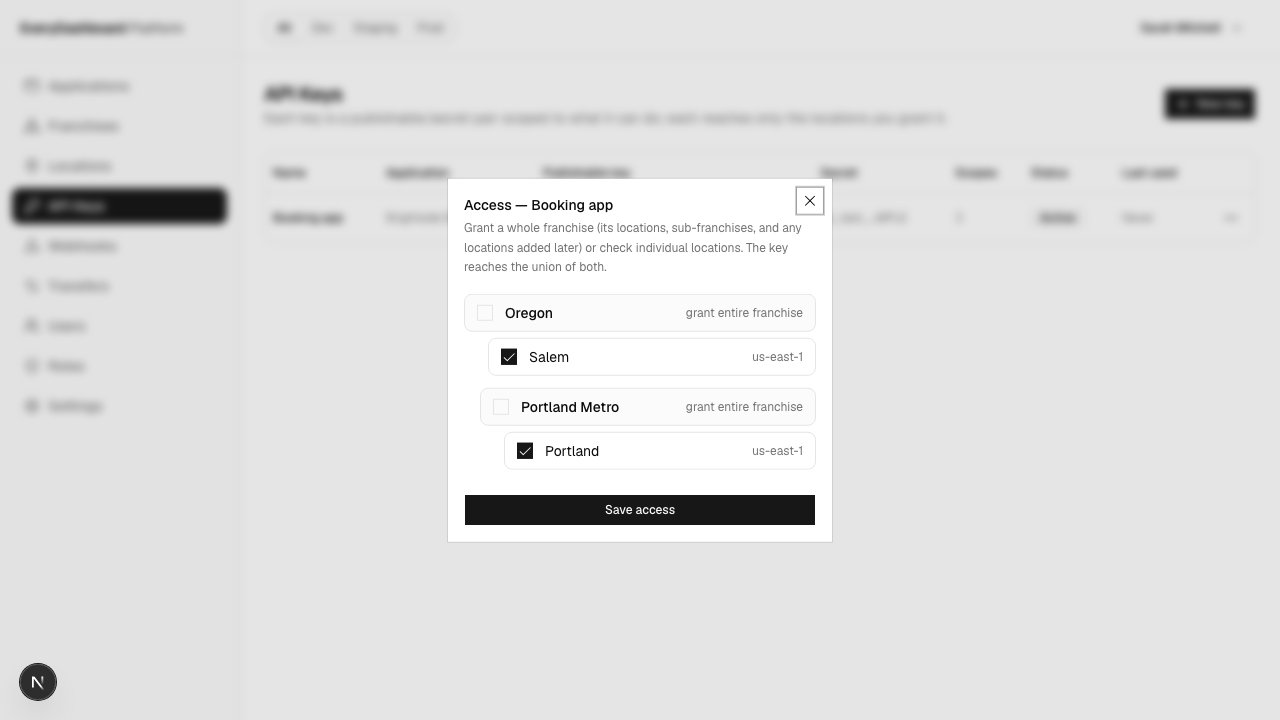
Access replaces the whole selection rather than adding to it, so what you leave ticked is what the key ends up with.
Finding your site ids
The Locations page lists every site you can see, with its group, region and whether it's ready. Each row has a copy action for the id.
For one site, storing that id in config is fine. For an app that serves several, ask us instead — your key can list what it reaches:
curl https://api.hyphabase.com/api/locations -u sk_live_xxx:{
"data": [
{ "id": "019aff48-…", "name": "Portland", "region": "us-west-2", "provisioning_status": "ready" },
{ "id": "019aff52-…", "name": "Salem", "region": "us-west-2", "provisioning_status": "ready" }
]
}This one endpoint takes no X-Location-Id — it's what you call to find out which id to
send. It returns the union of the key's own sites and everything under any group it's been
granted, so a site opened next year appears without you changing anything.
A site still being created is listed with provisioning_status: "pending" rather than
hidden, because that's the thing you'd poll.
Build your site switcher from this rather than a hardcoded list, and it stays right.
Moving a site between groups
Reorganising is cheap. Each site's row has a Move action; pick the group it should sit under.
The site's data isn't touched. Its customers, bookings and history stay exactly where they are — only where it hangs in the tree changes.
Handing a site to someone else
Sarah sells Salem to a former employee who has her own HyphaBase account.
Neither of them can do this alone — data can't be pushed at you, and it can't be taken from you:
Sarah offers it
From the site's row, Transfer, and the buyer's email address. Nothing moves yet.
The buyer accepts
It appears under Transfers in the buyer's own dashboard, where she picks which of her groups it lands in.
Either side can back out first — Sarah can cancel, the buyer can reject. Once it completes, Salem's customers and history belong to her, and Sarah's keys no longer reach it.